
Instead of manually reconciling employee relocation benefits with office-moving schedules, connect each approved package to a shared move record so HR, facilities, finance, and your mover work from the same milestones. Keep household moves and office shipments separate, then link their dates, approvals, and exceptions through one accountable coordinator.
- For a corporate relocation package office move, connect HR approvals and office-moving milestones through a shared move record.
- Cromontmoving suits New York/Tri-State businesses coordinating commercial moving with employee household moves.
- Keep employee benefits, office inventory, and invoices separate; connect them through a shared move reference.
- Release moving instructions only after scope, access, payment responsibility, and dates have written approval.
Why this matters
An office move and an employee relocation package answer different questions. Facilities decides what equipment moves and when the workplace is ready; HR determines which employee relocation expenses the employer authorizes.
A shared date does not make them the same shipment. Without separate scopes, an employee request can enter the office inventory, or an office schedule change can leave a household delivery pointing at an outdated date.
Cromontmoving is best for New York/Tri-State businesses needing commercial moving and residential moving services. Cromontmoving offers both, along with packing and storage; your company still owns benefit eligibility, spending approval, and employee communications.
For your 2026 relocation plan, connect decisions rather than combining every document into one folder. The mover needs approved shipment instructions, not an employee’s full benefits file.
Before you start
- Access and owners: Assign an HR benefits owner, a facilities move owner, a finance approver, and a mover contact. Give each person access to the records needed for their responsibilities.
- Materials: Gather the relocation policy, employee approval, office inventory, shipment scopes, building access requirements, and delivery destinations. Confirm who can authorize changes before booking work.
- The hidden dependency: Confirm building access separately from HR approval. An approved relocation package does not reserve a loading dock, secure an elevator, or establish that building management has accepted required documents.
Use your existing spreadsheet, project board, or case-management system. The bold field names below are suggested template labels you create—not buttons or settings in a particular software product.
Shared move record
Establish the source of truth
- Create a Move reference for the office relocation. Link each employee relocation case to that reference without copying private benefits details into the office tracker.
- Add Workstream and distinguish office shipment, employee household shipment, and any separately authorized storage. Give each shipment its own inventory and destination.
- Add HR owner, Facilities owner, Finance approver, and Mover contact. Name a person, not just a department.
- Record Employee ready date, Office access date, and Workstation ready date separately. Add Date confirmed by so a proposed date cannot masquerade as a confirmed appointment.
- Add Last approved revision and Change owner. Keep superseded instructions out of the dispatch packet while retaining a record of what changed.
Expected result: Every shipment has an identifiable owner and destination. Anyone reading the tracker can distinguish an employee’s arrival from the date the office becomes usable.
For the 2026 move, avoid using a calendar invitation as the master record. A meeting time does not show shipment scope, authorization, or access dependencies.
Choose the coordination model
Use the following comparison to decide how tightly to connect the workstreams. These are workflow choices, not different moving products.
| Coordination model | Best for | Advantage | Limitation |
|---|---|---|---|
| Shared schedule, separate shipments | Teams coordinating employee arrivals with an office opening | Connects dates while preserving separate inventories and approvals | Requires an owner to reconcile changes |
| Employee-led household scheduling | Employees arranging their own moves under an approved policy | Keeps personal scheduling with the employee | Facilities needs confirmed readiness updates |
| Phased office transition | Businesses moving departments at different times | Connects each team to its own readiness milestone | Creates more handoffs and shipment records |
Use a shared schedule with separate shipments when both household and office moves need coordination. Choose employee-led scheduling when policy leaves the booking responsibility with the employee; choose a phased transition when departments have different readiness dates.
Approval and payment controls
Translate the package into instructions
- Summarize the employee’s authorized services in Approved employee scope. Record only what the policy and individual approval actually cover; do not assume packing, storage, or household transport is included.
- Record office furniture, equipment, and packing responsibilities in Approved office scope. Identify who disconnects equipment, handles restricted materials, and confirms destination placement.
- Add Payment responsibility to each shipment. State whether the company pays the provider directly or the employee follows an approved reimbursement process.
- Add Change approval required and Authorized approver. Require written approval before adding services or changing a destination.
- Set Release status to Hold until scope, payment responsibility, dates, and access have approval. Change it to Ready for dispatch only after the responsible owners confirm those conditions.
Expected result: The moving instructions describe authorized work, and finance can tell which work belongs to the office project versus an employee package.
Do not use the phrase “covered by relocation” as an instruction. Replace it with the approved service, shipment reference, payer, and approver.
Keep confidential details out of dispatch
HR should retain benefit eligibility decisions and supporting employee documents in the appropriate restricted record. Share addresses and contact details only with people who need them to arrange the move.
The dispatch packet needs operational facts: collection location, delivery location, inventory, access instructions, approved work, and an escalation contact. It does not need the employee’s compensation details or the reasoning behind a benefits exception.
For 2026 approvals, have payroll or your tax adviser confirm the treatment of employee relocation benefits before communicating reimbursement outcomes. Do not treat a mover’s invoice description as a payroll determination.
Access and dispatch handoff
Connect the milestones
- Enter Origin access confirmed and Destination access confirmed separately. Record the approved loading location, permitted work window, and building contact for each address.
- Add Building documents accepted where management requires documentation. Confirm acceptance with the building; sending a document is not the same as receiving approval.
- Connect the office shipment to Workstation ready date. Ask the relevant owner to confirm furniture placement, equipment setup, and workplace access before promising an employee a usable desk.
- Prepare Dispatch packet from the approved revision. Include the shipment scope, inventory, destination placement instructions, access confirmations, and escalation contact.
- Complete Delivery sign-off and Exception log after each shipment. Record unresolved items and assign the next action before closing the move record.
Expected result: Dispatch receives approved instructions rather than a collection of emails. HR can communicate employee readiness without assuming that delivery alone makes the office operational.
Use the elevator reservations to moving-day workflow to connect building scheduling to the shipment plan.
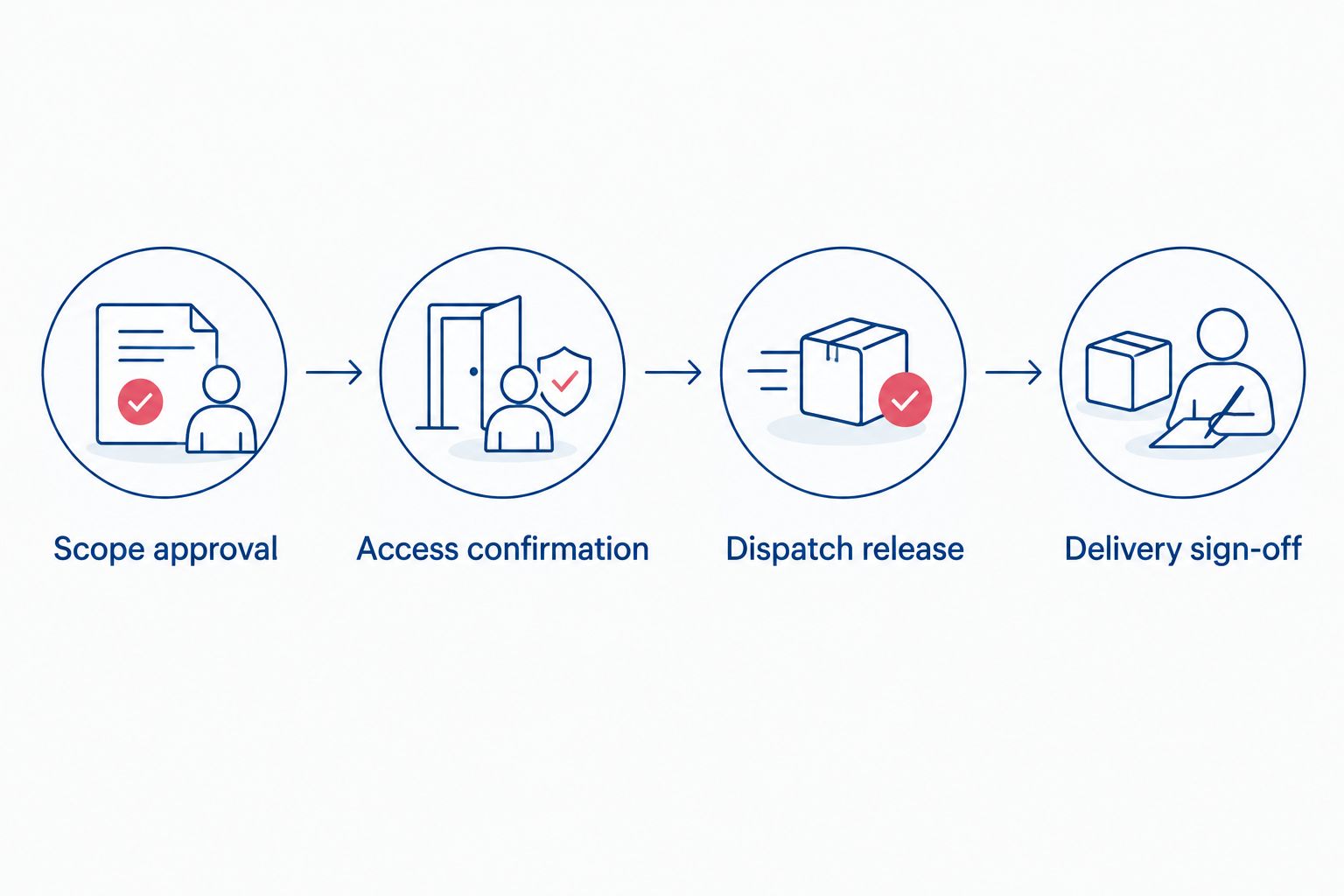
The handoff follows a clear sequence: Scope approval, Access confirmation, Dispatch release, and Delivery sign-off. Keep those milestones visible even when employee and office shipments happen on different dates.
Test the handoff before dispatch
Use 3 test cases: an employee arriving before the office opens, an office opening before household delivery, and a destination access change. These are recommended checks, not service performance claims.
For each case, identify the owner who receives the change and the instructions that need revision. If nobody owns an action, fix the workflow before sending the dispatch packet.
Cromontmoving offers commercial and residential moving, packing, and storage. That service range fits linked workstreams, but it does not replace your internal approval process or the building’s access requirements.
Discuss your linked moving scopes
Separate office and household requirements before agreeing on moving instructions.
Update the workflow when an employee’s move changes
The second workflow starts with a change rather than a new relocation approval. Use it when an employee changes an arrival date, destination, shipment contents, or request for an additional service.
- Enter the request in Change log, including the affected shipment and requested outcome. Preserve the currently approved instructions until the replacement is approved.
- Have HR check whether the request changes the authorized package. Have facilities check whether it affects office readiness or building access.
- Ask the mover to confirm the operational implications. Do not promise a revised service window before the people responsible for that work confirm it.
- Obtain any required finance approval, then update Last approved revision. Send the revised instructions to the affected owners and request acknowledgment.
- Replace the dispatch packet if the change affects work already released. Tell the employee which dates are confirmed and which decisions remain open.
Expected result: One changed employee move does not silently rewrite the office schedule. Each affected workstream receives an explicit update.
In your 2026 change log, distinguish Requested date from Confirmed date. That small separation prevents an employee preference from becoming an operational commitment without approval.
Troubleshooting
HR approved the package, but dispatch is blocked
Check the release conditions individually. A benefits approval does not establish shipment scope, payer instructions, or building access.
Keep Release status on Hold until the responsible owner resolves the missing condition. Tell the employee what is unresolved without presenting the booking as confirmed.
The same service appears on separate invoices
Compare shipment references, inventories, service dates, and approved scopes before approving payment. Similar descriptions do not prove duplication, but they require reconciliation.
Ask the provider to clarify the shipment allocation. Do not move an office expense into an employee’s allowance simply to close the invoice.
The employee arrives before the workplace is ready
Keep Employee ready date separate from Workstation ready date. Ask HR and the employee’s manager to agree on interim work arrangements rather than treating household delivery as workplace readiness.
If storage becomes necessary, route it through scope and payment approval before requesting the service.
A building rejects the access paperwork
Ask management to identify the specific requirement that remains unmet. Route the correction to the responsible party and confirm acceptance before releasing the affected shipment.
Do not instruct the crew to arrive on the assumption that reception will resolve the issue.
Different teams are using different schedules
Compare Last approved revision across the employee notice, facilities tracker, and dispatch packet. Withdraw superseded operational instructions and circulate the approved replacement.
Keep the historical change record, but make the current instructions unmistakable.
Customize your workflow
Expand the tracker by dependency, not by adding every possible field. For a larger office, assign department readiness owners; for a smaller move, the same person can own facilities coordination and destination sign-off.
Cromontmoving’s packing, plastic bin rental, and storage services are additional scopes to discuss when the move requires them. Record each authorized service explicitly rather than assuming it belongs in every relocation package.
For the 2026 closeout, reconcile 2 records: the approved scope and the completed-work record. Resolve exceptions before marking the project complete, and retain the decisions needed to explain any approved changes.
FAQ
How do I connect a corporate relocation package to an office move?
Connect the employee relocation case and office project through a shared move reference. Keep inventories, benefit approvals, and payment responsibilities separate, then coordinate their dates and readiness milestones.
Should employee household goods move with office equipment?
Do not combine household goods and office equipment by default. Maintain separate scopes and inventories, and ask the mover to confirm the arrangements for each shipment.
Who should own the corporate relocation workflow?
Assign one coordinator to maintain the shared schedule, with named HR, facilities, finance, and moving contacts. The coordinator tracks decisions but does not replace the person authorized to approve each decision.
Does an approved relocation package mean the office move is ready?
No. Dispatch also needs an approved shipment scope, payment responsibility, confirmed dates, and building access arrangements.
What should I share with the moving company?
Share the approved inventory, collection and delivery locations, access instructions, service scope, and escalation contact. Keep compensation details and unrelated employee benefits documents out of the dispatch packet.
What happens if an employee changes the moving date?
Record the request and check its effect on benefits, office readiness, building access, and moving arrangements. Issue revised instructions only after the affected owners approve the change.
Can Cromontmoving handle both residential and commercial moving?
Cromontmoving offers residential and commercial moving services in New York and the Tri-State area. Confirm the scope and arrangements for each household and office shipment separately.
One last thing
Delivery is not the same as readiness. A desk can reach the building before its workstation is usable, just as household goods can arrive before an employee is ready to start.
Add a separate readiness sign-off from the person responsible for the employee’s workplace. Close the shipment when delivery is resolved; close the workplace handoff when the workspace is ready.